
TrendRoute Sandbox
A practical guide to exploring TrendRoute.ai across single-route, multi-route, shipment and dynamic route-extension scenarios.
Built for experimentation
Use predefined scenarios, create test cases directly on the map, or upload your own routing problems to evaluate how TrendRoute.ai performs on challenges that resemble your operation.
Testing and evaluation environment - not for production routing
1. Introduction
The TrendRoute Sandbox is an interactive environment designed for logistics, transportation and software teams that want to explore how a modern route optimisation engine behaves on realistic routing problems - before integrating it into production.
Rather than asking users to evaluate TrendRoute.ai based only on product claims, the Sandbox makes optimisation visible, interactive and measurable. Users can work with predefined scenarios, create their own test cases directly on the map, upload their own routing problems, compare alternative optimisation methods, inspect route quality visually, introduce operational constraints, and manually challenge the generated solutions.
The Sandbox covers several routing challenges, from optimising the sequence of stops for a single courier to allocating deliveries across multiple vehicles, handling pickup-and-delivery operations, routing multi-step shipments, and inserting newly arriving parcels into existing recurring routes.
The objective
Give logistics and technology teams a practical way to test how TrendRoute.ai handles real routing challenges and evaluate the results using measurable operational criteria.
Predefined scenarios
Start immediately with ready-made examples designed to expose different routing behaviours.
Your own test cases
Upload representative single-route or multi-route problems and benchmark TrendRoute.ai on your own data.
Map-based testcase creation
Build a routing problem visually by pinning a hub and stops directly on the map.
Interactive benchmarking
Compare solvers, inspect route shape, add constraints, reorder routes and explore what changed.
Explore TrendRoute.ai
The Sandbox gives teams a low-risk way to explore TrendRoute.ai before considering API integration or production deployment. Start with a predefined scenario, then create or upload your own testcase and see how the engine handles a problem that matters to your operation.
2. Accessing the TrendRoute Sandbox
The Sandbox is accessible from the Route Optimisation Sandbox button on the TrendRoute.ai website.
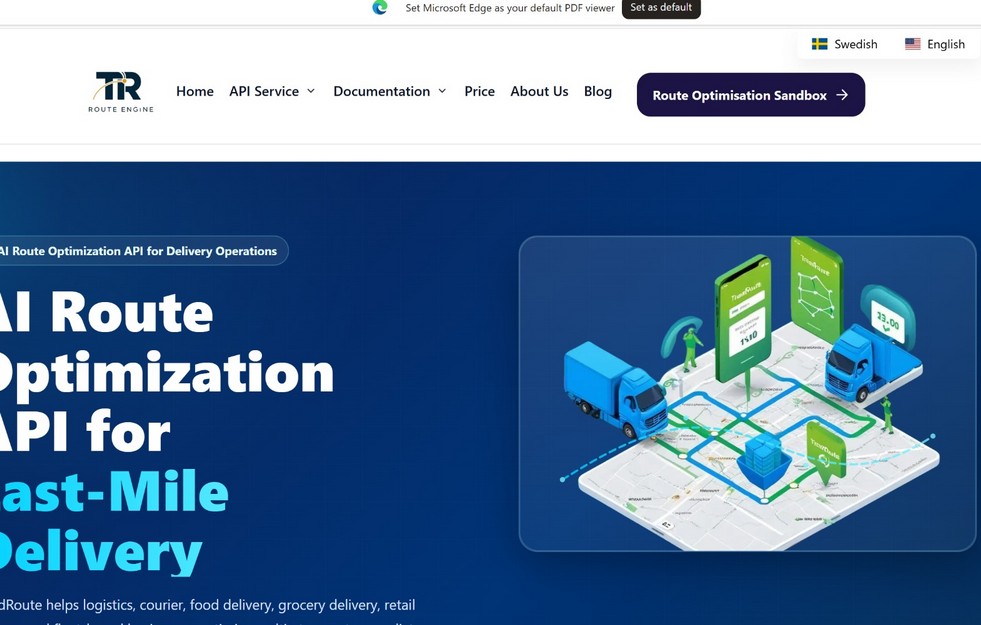
Access the Sandbox from the TrendRoute.ai website.
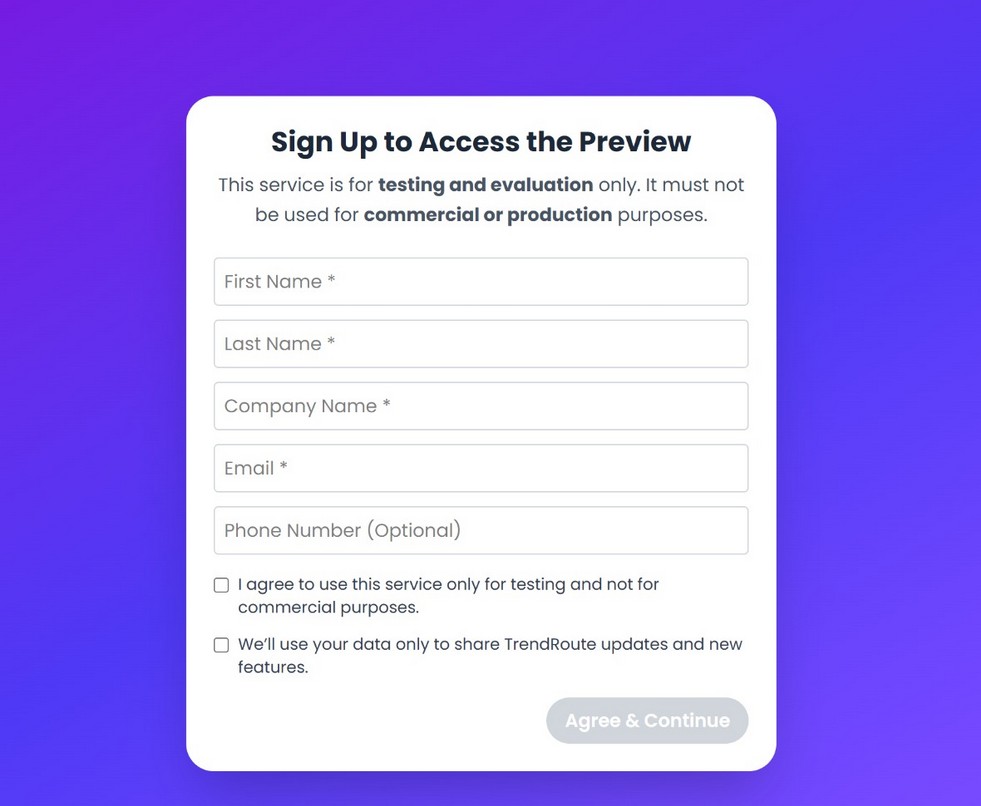
First-time preview access and testing-only acknowledgement.
First-time access
On the first visit, users register for preview access by providing basic contact and company information and accepting the testing-only conditions. The Sandbox is provided for testing and evaluation and should not be used as a commercial or production routing environment.
After the initial registration, the browser remembers the user through local session/cookie information, so registration does not normally need to be repeated on every visit from the same browser.
Experimentation limits
User-uploaded test cases are limited to 3 cases per day and 50 cases per month. These limits provide enough room for meaningful evaluation while keeping a clear boundary between Sandbox experimentation and production routing.
3. Choose the Routing Challenge You Want to Test
After entering the Sandbox, users select the routing problem that best represents the scenario they want to explore. Five modes are available, each exposing a different capability of the optimisation engine.
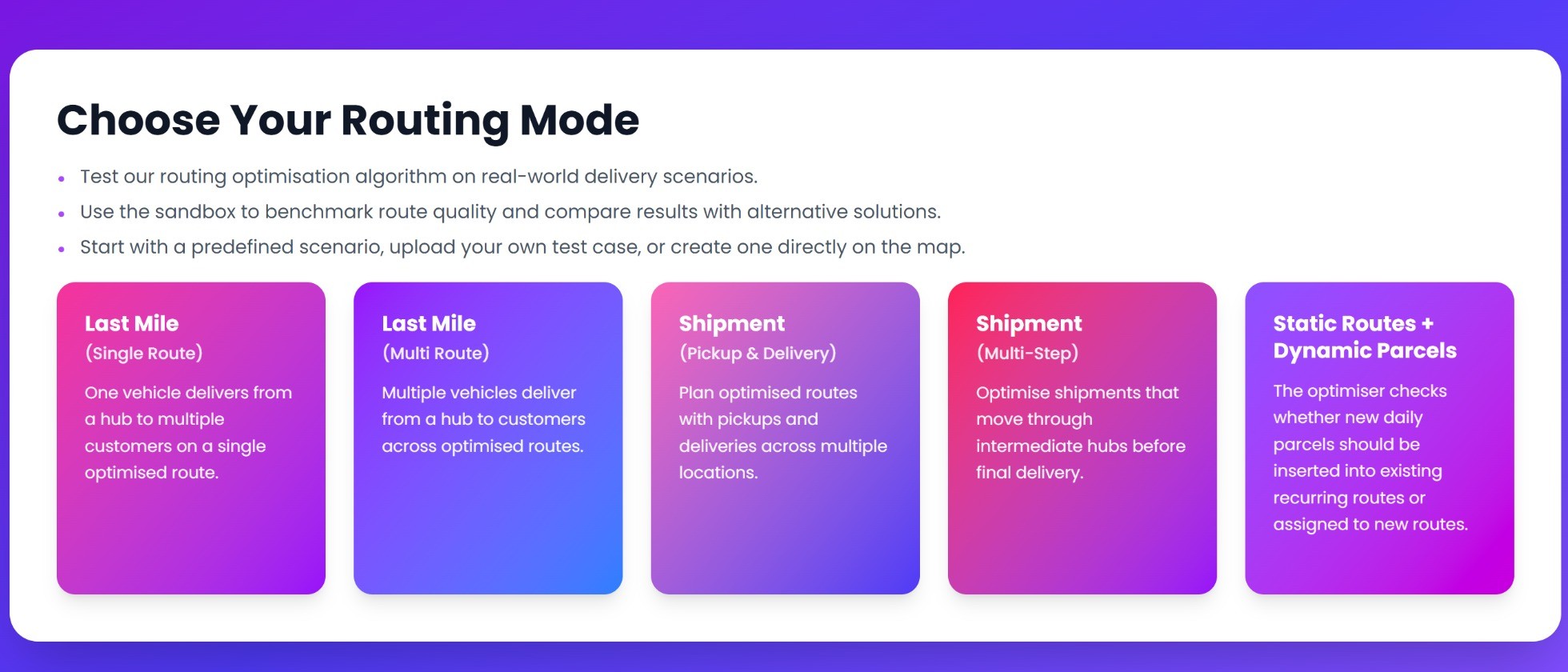
Choose the routing mode that best matches the operational challenge you want to test.
3.1 Last Mile - Single Route Optimisation
Last Mile - Single Route is the most comprehensive benchmarking area of the TrendRoute Sandbox. A single vehicle starts from a hub and visits a set of delivery stops, and the optimisation problem is to determine an efficient sequence in which those stops should be served.
At first glance this can appear straightforward. In practice, a mathematically short route may still contain zig-zagging, backtracking, crossing edges, repeated visits to the same area, poor geographical progression, or inefficient decisions about when to drive and when to walk.
Compare recognised optimisation approaches on the same testcase
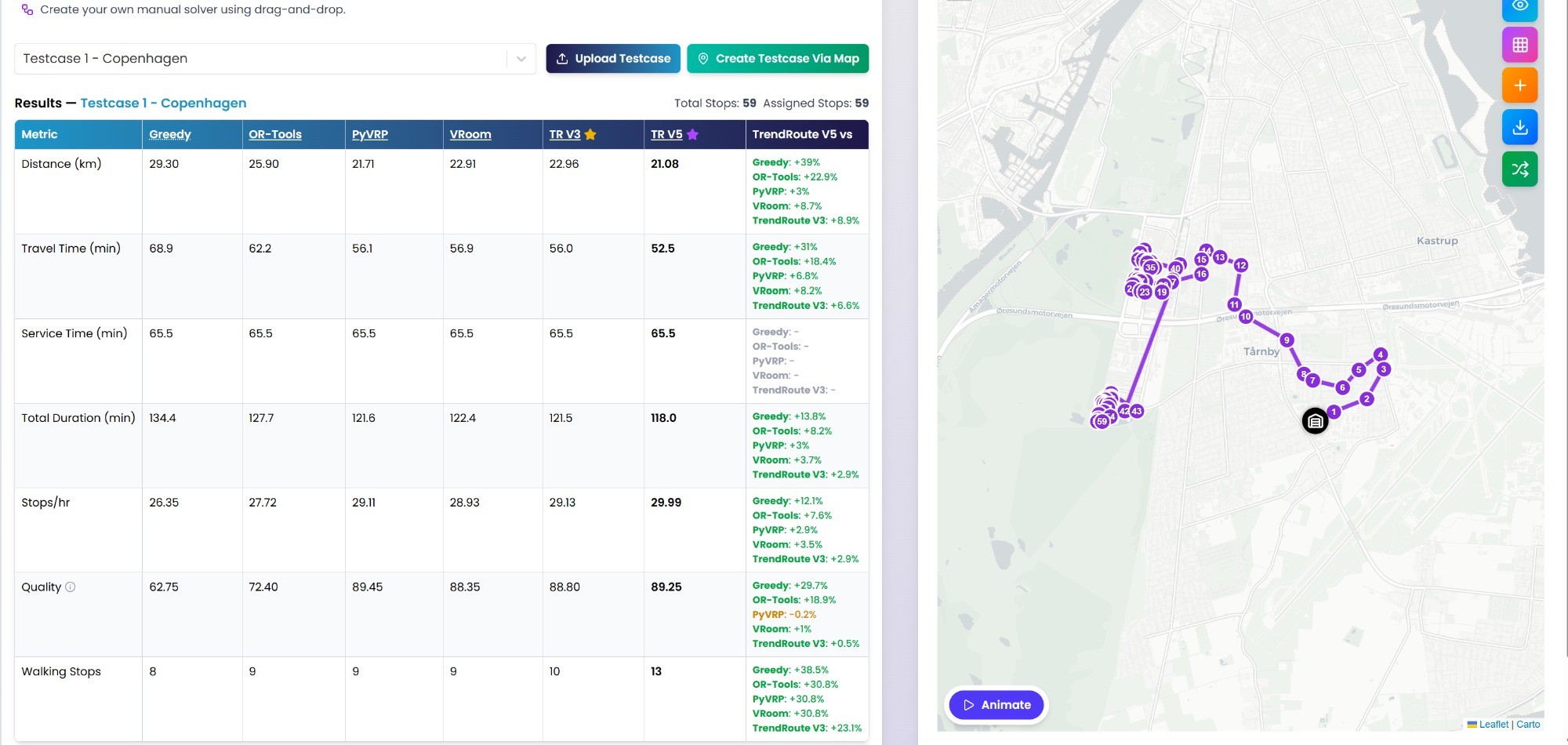
For predefined test cases, users can compare Greedy, OR-Tools, PyVRP, VRoom, TrendRoute V3 and TrendRoute V5 on the same routing problem. Solutions can be inspected on the map and compared numerically in the results table.
A broader question than "Which route is shortest?"
The Sandbox is designed to help users evaluate which solution produces the strongest combination of distance, travel time, productivity and operationally sensible route shape.
Single Route benchmarking: solver comparison, route metrics and interactive map in one view.
3.1.1 Create a Testcase in the Way That Suits You
Users do not have to rely only on TrendRoute-provided examples. The Sandbox supports three convenient ways to create a Single Route experiment.
Use a predefined testcase
Start immediately with a ready-made routing problem and compare the available optimisation methods.
Upload your own testcase
Use a representative historical or synthetic case to evaluate TrendRoute.ai on a routing problem that resembles your own operation.
Create a testcase directly on the map
For non-technical users, pin the hub and delivery stops directly on the map without preparing a structured input file.
The map-based workflow is especially useful for dispatchers, operations managers and other users who want to experiment with geography without dealing with file formats. Users can choose a hub location, add stops by clicking on the map, and run the optimisation directly.
Upload allowance
User-uploaded cases are limited to 3 per day and 50 per month. Map-based experimentation and predefined scenarios help users explore the Sandbox without turning it into a production routing environment.
3.1.2 Measure More Than Distance
The Single Route comparison table intentionally goes beyond one headline metric. Route optimisation quality should be evaluated from several operational perspectives.
Distance
Total route distance. Even modest improvements can become significant at fleet scale.
Travel time
Estimated time spent travelling between stops. The shortest route in kilometres is not always the fastest.
Service time
Time spent performing work at stops, kept separate from routing travel time.
Total duration
The complete expected route duration including travel and relevant service components.
Stops per hour
A practical productivity metric showing how efficiently a courier can complete deliveries.
Route quality
A score for the operational shape of the route, complementing conventional distance and duration metrics.
Route Quality - does the route actually make sense?
Experienced dispatchers and couriers often recognise poor route shape immediately, even when the numerical distance appears competitive. The Quality Score is designed to capture characteristics such as crossing edges, zig-zagging, backtracking, repeated returns to a previously served area, unnecessary detours and weak geographical coherence.
This is particularly valuable when two solvers produce similar distance or duration but noticeably different route shapes.
3.1.3 Inspect, Challenge and Understand the Route
The Sandbox is designed to let users investigate why a route behaves the way it does, not only view a final number.
Light View / Map View
Switch between a simplified visualisation for analysing route shape and a richer map view for road and geographical context.
Show Direction
Display the real navigable path between consecutive stops instead of relying only on straight-line connections.
Matrix Mode
Inspect Haversine distance, map-based road distance and travel duration between pairs of locations.
Add Time Window
Apply a time window to a selected stop and observe how the operational constraint changes the route.
Walking vs driving
See where the engine recommends walking between nearby stops rather than moving the vehicle; walking legs are shown differently, including dotted segments.
Walking Saving Time
Estimate the time saved when the engine makes an efficient walk-versus-drive decision.
Reorder route
Change the sequence manually and see whether the modification improves or worsens route metrics and route shape.
Export HTML
Save a route visualisation for later review, side-by-side comparison or internal sharing.
Animate the route
The Animate feature lets users watch the route progress from one stop to the next instead of viewing the complete sequence only as a static picture. This makes natural progression, unexpected jumps, backtracking and repeated visits to an area easier to recognise.
The route map supports visual inspection, solver switching and animation of the visit sequence.
3.1.4 Think You Can Beat the Optimiser? Try Manual Routing
For users who want to interact with the routing problem directly, the Sandbox includes a manual-routing challenge. Instead of accepting an optimised sequence, the user selects the order in which the stops should be visited.
To keep the challenge engaging, the user has a maximum of two minutes to create the route. The interface tracks the remaining stops as the sequence is built.
The challenge
Can you create a better route than the AI-powered TrendRoute V3 or TrendRoute V5 solution within two minutes?
Once the manual sequence is complete, the result can be compared with the optimiser. This is both an entertaining way to explore route planning and a practical demonstration of how quickly manual construction becomes difficult as the number of stops grows.
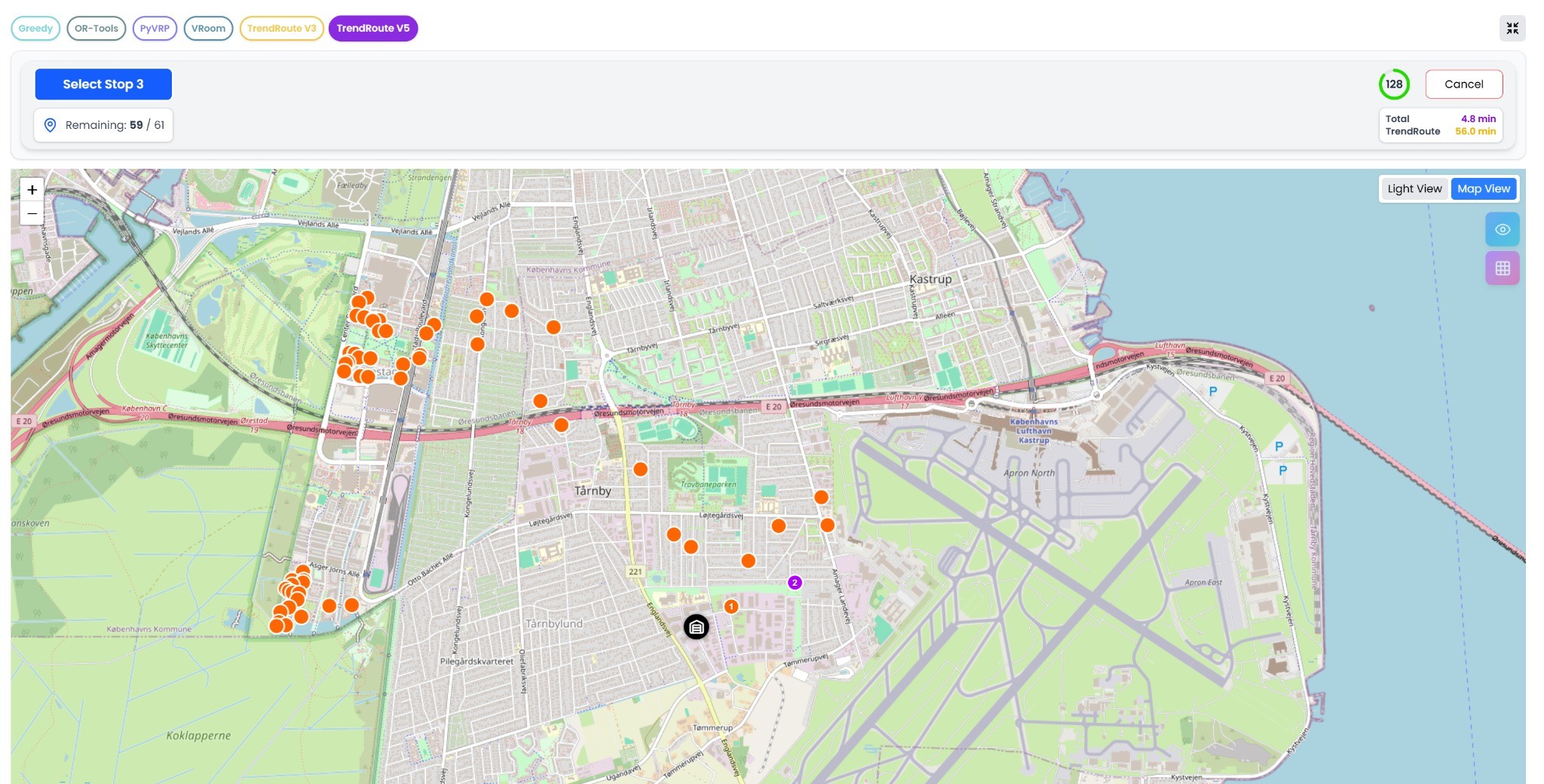
Manual Routing challenge: select the stop sequence directly on the map while the time-limited challenge is running.
Reorder an existing route
Manual experimentation is not limited to building a route from scratch. Users can also modify the sequence of an existing route and see whether the change reduces or increases distance, travel time, total duration and route-quality measures. It turns a dispatchers intuition into something that can be measured.
3.2 Last Mile - Multi Route Optimisation
Single-route optimisation determines the best sequence for one vehicle. Multi-route optimisation introduces a larger challenge: how should all deliveries be divided between multiple vehicles, and how should each vehicles route then be optimised?
The engine must solve assignment and sequencing together. A strong solution should minimise unnecessary overlap between vehicles while creating geographically sensible and operationally balanced routes.
Fleet configuration
Test the number of vehicles, route limits and return-to-hub behaviour.
Operational constraints
Explore maximum distance, maximum duration, maximum/minimum stops per route and service time.
Visual fleet inspection
Routes are displayed separately on the map using different colours, making allocation and overlap easy to inspect.
Upload your own case
Benchmark TrendRoute.ai on representative multi-route problems from your own operation.
Uploaded multi-route cases are subject to the same evaluation allowance of 3 uploaded cases per day and 50 per month.
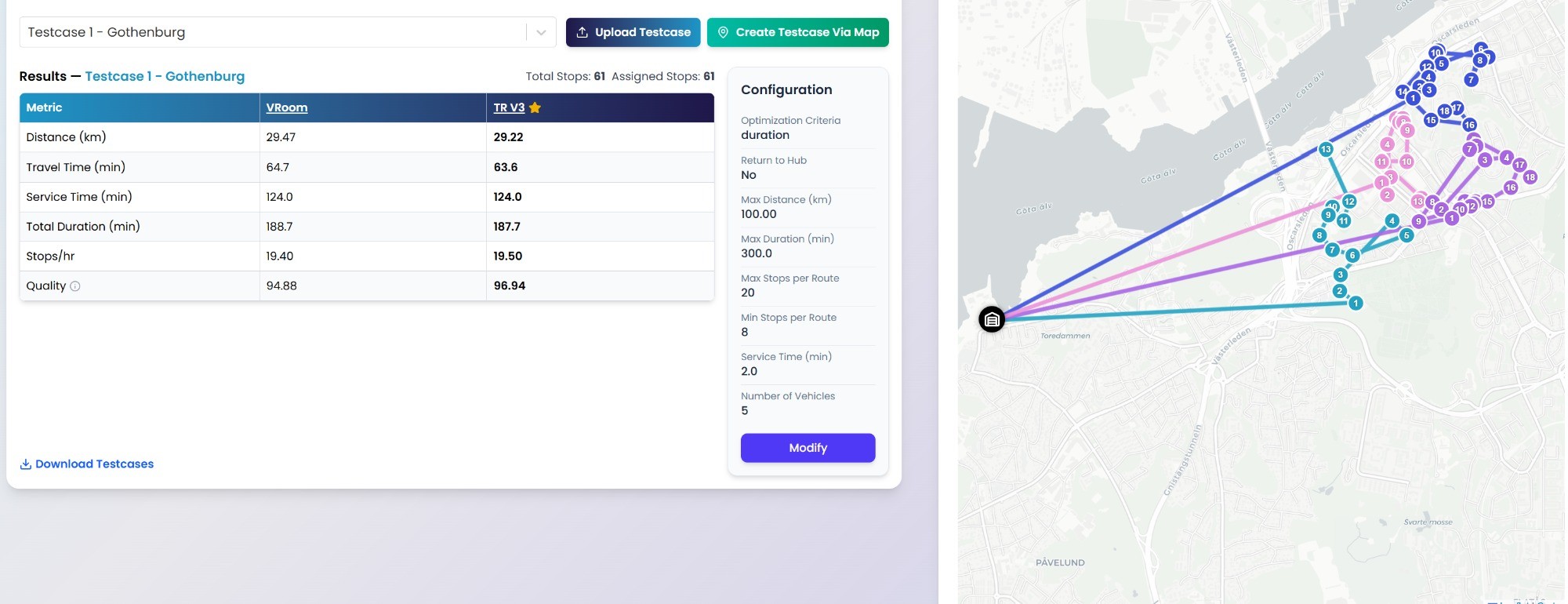
Multi-route optimisation: fleet allocation, route constraints, comparison metrics and geographic route structure.
3.3 Shipment - Pickup & Delivery
Pickup-and-delivery routing introduces a precedence requirement: a shipment must be collected before it can be delivered. The optimiser therefore needs to find an efficient route while preserving the relationship between each pickup and its corresponding delivery.
This routing model is particularly relevant to express delivery, food delivery, on-demand transport, courier services and other collection-and-delivery operations.
Example
A courier may collect orders from several restaurants and deliver them to different customers. The route must remain efficient while every pickup is completed before its corresponding delivery.
The map visually distinguishes pickup and delivery locations, while the results expose familiar metrics such as distance, travel time, service time, total duration, stops per hour and route quality.
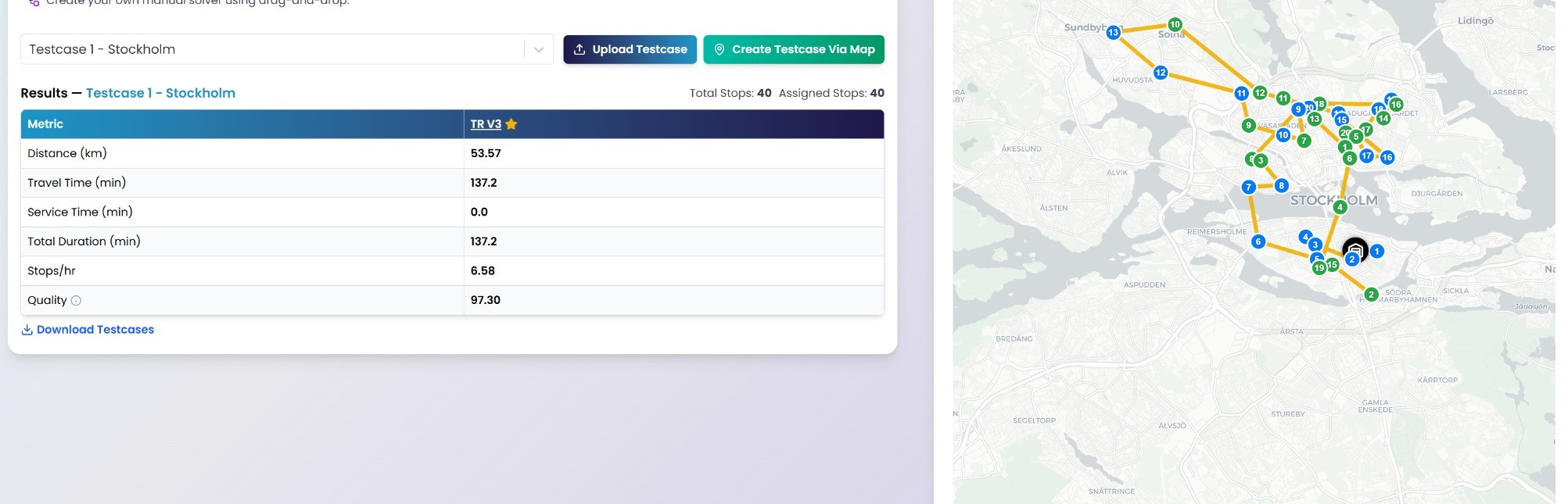
Pickup & Delivery mode: paired pickup/delivery stops visualised on the route map.
3.4 Shipment - Multi-Step
Some shipments require more than a pickup and final delivery. An item may need to pass through another location before reaching its destination.
Example
An item is picked up at Location A, taken to Location B for validation, processing or an update, and then transported to its final destination at Location C.
Within the current Sandbox scenario, a shipment can include 0 or 1 intermediate step between pickup and final delivery. The general routing concept can be extended to support more intermediate steps for operations that require more complex flows.
The Sandbox distinguishes pickup, delivery, pickup & delivery, and hub locations, and provides tools such as Show Timeline and Start Leg Navigator to help users understand the sequence and connection between shipment legs.
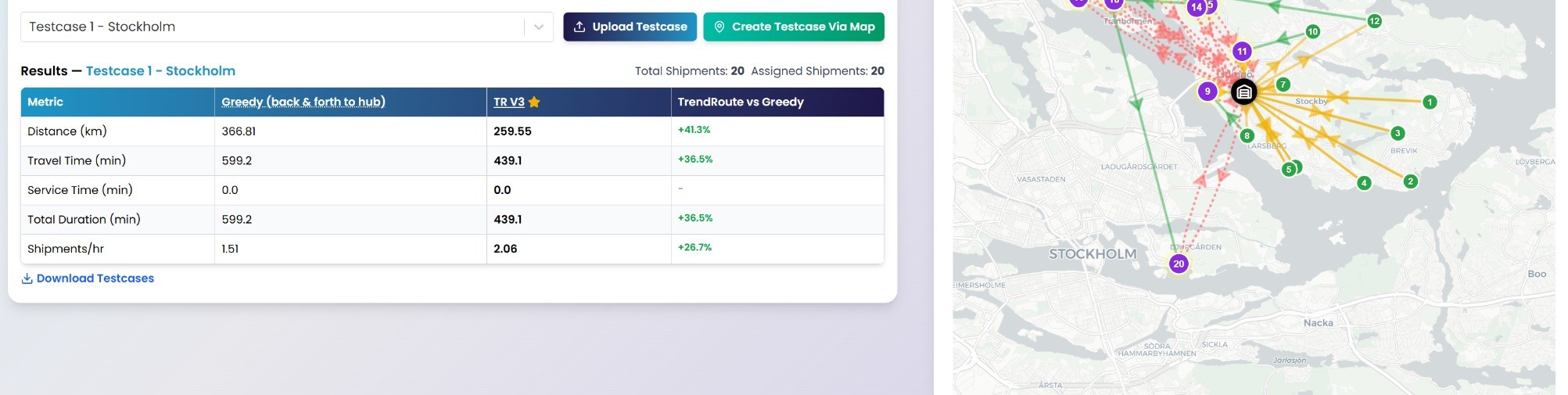
Multi-Step mode: visualise pickup, intermediate handling and final delivery within one coordinated routing problem.
3.5 Static Routes + Dynamic Parcels
Many logistics operations start from static or recurring routes that already contain their normal deliveries. The challenge is what happens when new orders arrive after those routes have been planned.
Static Routes + Dynamic Parcels demonstrates how TrendRoute.ai can extend an existing plan rather than rebuilding everything from scratch.
Start with existing routes
The scenario begins with recurring/static routes and their already assigned stops.
Add dynamic orders
Users can introduce new unassigned orders directly in the Sandbox.
Insert where feasible
The engine looks for a suitable nearby route with enough capacity and compatible constraints.
Create a new route when needed
If existing routes cannot absorb the remaining orders, a new route can be created for them.
Before and After comparison
The results view makes the impact of route extension measurable by comparing distance, travel time, service time, total duration, number of stops and stops per hour before and after the dynamic orders are introduced. The interface also provides Extend and Rearrange controls for further experimentation.
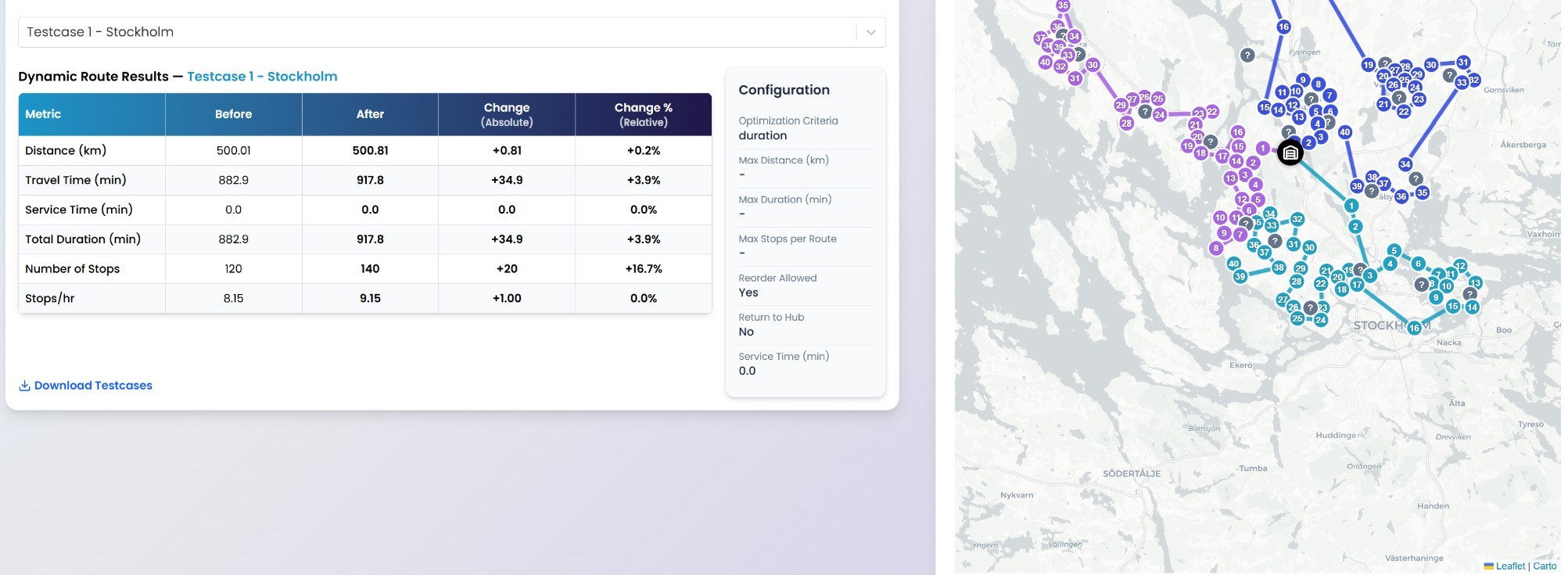
Dynamic route extension: compare the existing plan with the extended plan after new parcels are introduced.
4. A Sandbox for Benchmarking - Not Just Demonstration
The TrendRoute Sandbox was intentionally designed to be more than a polished product demo. Route optimisation is a difficult engineering problem, and realistic logistics operations involve much more than finding the shortest line through a collection of coordinates.
A strong routing engine may need to handle difficult geography, dense urban areas, large numbers of stops, multiple vehicles, time windows, pickup-before-delivery constraints, multi-step shipment dependencies, walking and driving decisions, recurring routes, dynamic orders, route-shape quality and different optimisation objectives.
Our principle
Route optimisation technology should be tested rather than simply described. The Sandbox gives users the tools to examine multiple approaches, inspect route shape, measure numerical differences, introduce constraints and challenge the optimiser themselves.
A practical benchmarking approach
- Use the same routing problem and equivalent operational assumptions.
- Compare distance, travel time and total duration.
- Compare productivity through stops per hour.
- Inspect route quality and geographical progression visually.
- Check operational feasibility and walking decisions where relevant.
- Upload a representative testcase when you want the comparison to reflect your own operation.
Why we built it this way
At TrendRoute.ai, we have built multiple optimisation capabilities because real logistics problems are diverse and often difficult. The best way to understand that capability is to challenge it with a realistic problem.
Does the route only look good in the numbers?
Or would a dispatcher actually use it in daily operations?
Does it stay strong under constraints?
Add time windows, route limits and operational rules and observe what changes.
Can a human planner do better?
Use Manual Routing or reorder the route and compare the result.
How does it compare with recognised solvers?
Run the same testcase across alternative methods and inspect the difference yourself.